
Watch YouTube on the TV without most ads
SmartTube blocks video ads and many in-feed promotions, so tutorials and long videos play with fewer interruptions.
SmartTube is a free YouTube app for Android TV and Fire TV. You install the APK yourself, skip most ads, and control quality with a TV remote.
Stable v32.56 is the build we recommend. Download it on an Android phone or on the TV, then install it on Nvidia Shield, Fire TV Stick, Sony Android TV, or Chromecast with Google TV.
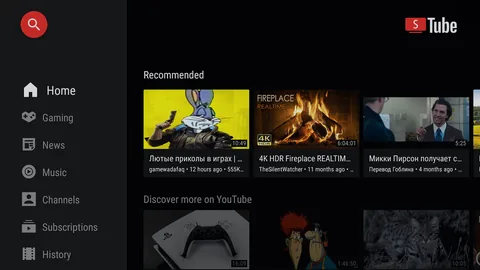
SmartTube is an open-source YouTube client for Android TV and Fire TV. The menus work with a remote. You can download the APK on a phone and copy it to the TV.
SmartTube blocks video ads and many in-feed promotions, so tutorials and long videos play with fewer interruptions.
Community skip segments cut sponsored intros and outros. The feature works inside the TV app, not in a browser.
Set resolution and codec to match your Wi-Fi. Nvidia Shield and Fire TV Stick 4K handle high bitrate 4K on a strong network.
Link your Google account in settings to bring subscriptions, playlists, and watch history onto the TV.
Search, subscriptions, and channel rows are built for the directional pad on Android TV and Fire TV remotes.
SmartTube is an open-source YouTube client for Android TV, Google TV, and Fire OS. Yuriy Liskov maintains the project. Older names include SmartTubeNext, STN, Smart YouTube, and Smart YouTube TV. The installed package is com.liskovsoft.smartyoutubetv2.
Most people save the APK on an Android phone, then install it on a TV or Firestick.
The app is not on Google Play. You install the APK yourself. That takes a few minutes and gives you a TV player with its own settings.
Sony, TCL, and Hisense Android TVs run SmartTube after you allow unknown sources and open the APK in a file manager. Chromecast with Google TV uses the same steps.
On a phone, open the download page in Chrome, save the APK, and copy it with USB, cloud storage, or Send Files to TV. Fire TV Stick users install with Downloader.
Use the Android TV guide or the Firestick guide when you need the full sequence.
Stable 32.56 restores Not interested and Don't recommend channel in the context menu, fixes Hide shorts in News (turn the option off and on again), reduces rare stutters from background sync, and raises thumbnail resolution. Read the GitHub release notes for the full list.
Install the new APK over the old copy. Most settings stay. If a video fails after an update, clear the SmartTube cache once and try again on Wi-Fi.
Beta 32.68 is the test channel with playback error fixes. Daily viewing should use stable. Compare both on the beta vs stable page.
Swipe on mobile or tap any preview to enlarge.
Download the stable APK, allow your installer app to install unknown apps, and open SmartTube from the app list.
Open the download page and save the 32.56 universal build (about 33 MB).
On Android TV, allow installs for your file manager. On Firestick, use Developer options for Downloader.
Open the APK from Downloads or USB. Confirm package com.liskovsoft.smartyoutubetv2 before you tap Install.
Open SmartTube, connect to Wi-Fi, and sign in with Google if you want subscriptions on the TV.
Add SmartTube to the Android TV or Fire TV home row so you can open it with one click.
SmartTube runs on Android TV and Firestick. You can download the APK on a phone, then install it on the TV.
| Device / platform | SmartTube support | Notes |
|---|---|---|
| Android TV / Google TV | Full support | Sony, TCL, Shield, Chromecast with Google TV, Mi Box |
| Android phone / tablet | Download and install | Handy for fetching the APK. The UI is built for TV. |
| Fire TV Stick / Fire TV Cube | Install with Downloader | See the Firestick guide |
| Samsung Tizen TV | Not native | Use a Fire TV Stick or Android box on HDMI |
| LG webOS TV | Not native | Attach a Firestick or Chromecast with Google TV |
| iPhone / iPad | No APK | Use the official YouTube iOS app |
Download the latest stable APK and install it on Android TV or Firestick.
Download latest APK